Some useful commands for ROS in Ubuntu
ROS is an open-source, meta-operating system for your robot. Some advantages are as follows.
- Distributed computation
- Software resure
- Rapid testing
Packages
rospack list
# You can obtain a list of all of the installed ROS packages.
rospack find package-name
# find the directory of a single package
rosls package-name
# view all files in the package directory
roscd package-name
# go to the package directory directly
Nodes
ROS node communication network
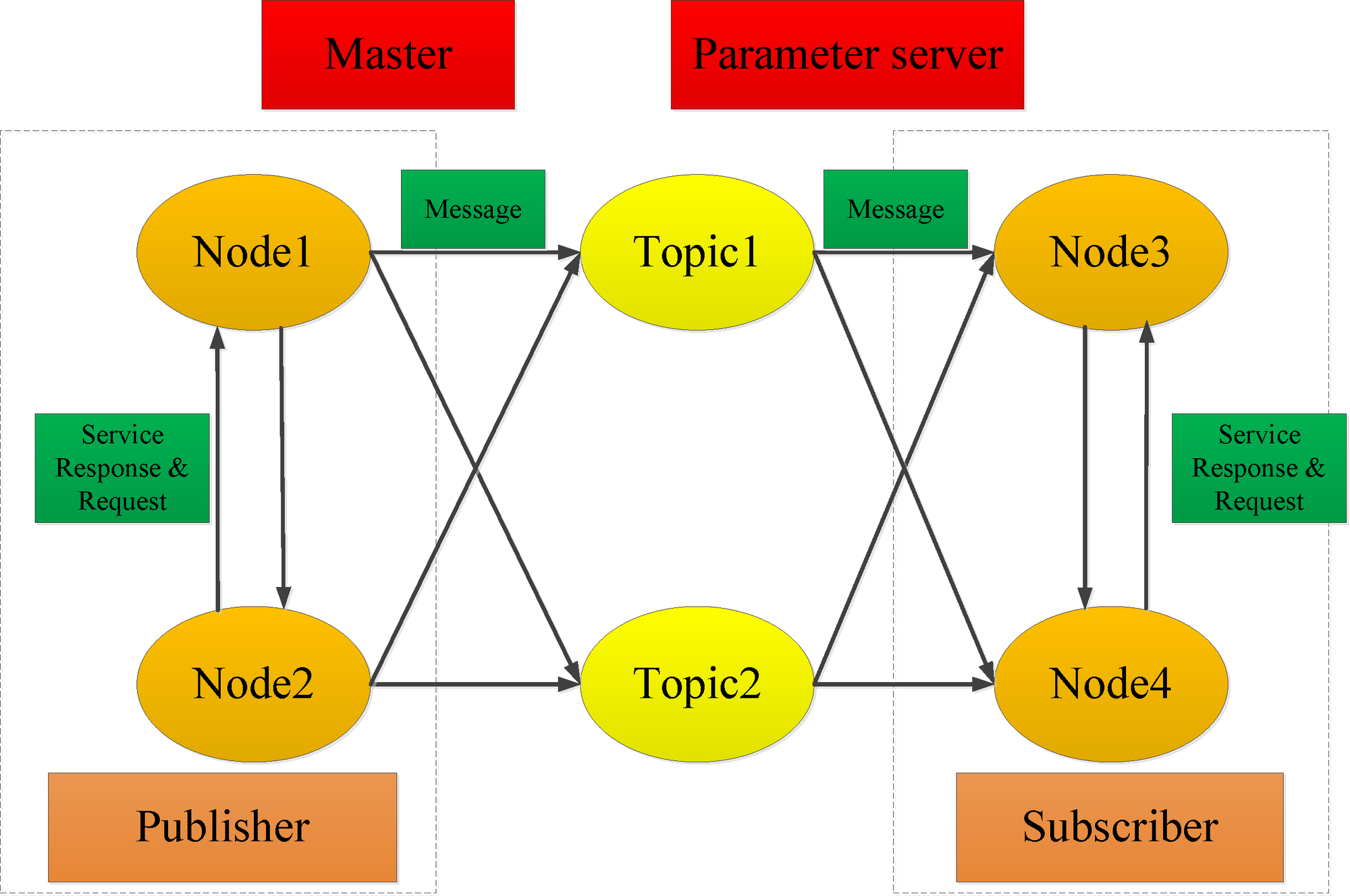
rosrun package-name executable-name
# Starting a node
rosnode list
#listing nodes
rosnode info node-name
# get some information abour a particular node.
rosnode kill node-name
# Killing a node.
rosnode cleanup
#remove the dead nodes from the list.
rqt_graph
# veiwing the graph
rosmsg show message-type-name
#inspecting a message type.
rostopic pub -r rate-in-hz topic-name message-type message-content
# publishing messages from the command line.
rosrun turtlesim turtlesim_node __name:=A
rosrun turtlesim turtlesim_node __name:=B
# run the same node with different name, as ROS master does not allow multiple nodes with the same name.
roswtf
# perform a broad variety of sanity checks.
Creating a workplace and a package
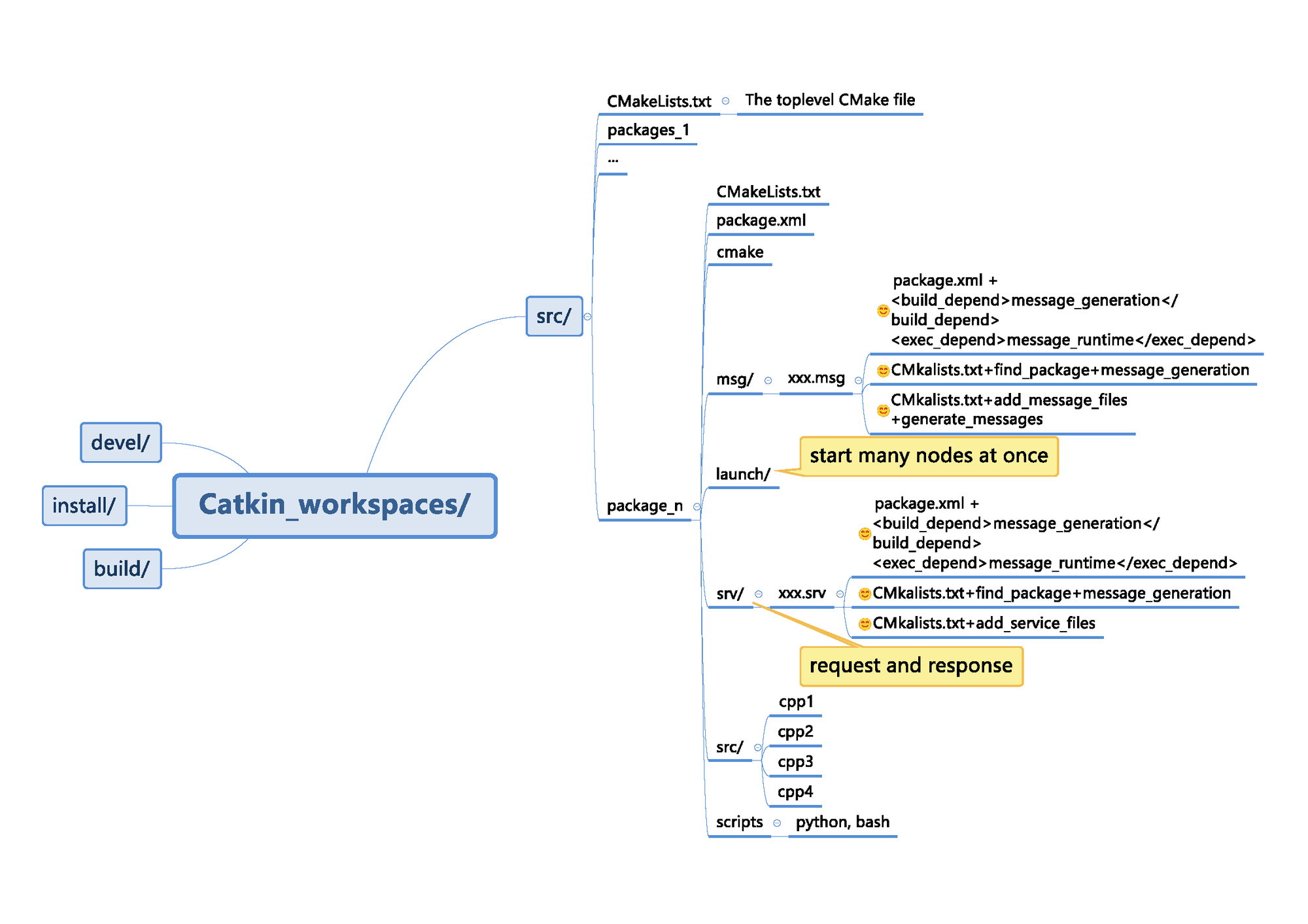
user@hostname$ mkdir -p ~/catkin_ws/src
user@hostname$ cd ~/catkin_ws/src
user@hostname$ catkin_init_workspace
user@hostname$ source devel/setup.bash
user@hostname$ cd ~/catkin_ws/src
user@hostname$ catkin_create_pkg my_package_name
# creating two default versions of these two configuration files: package.xml and CMakeLists.txt.
The first program ‘hello world’ in ROS
- Step 1: Write the
helle worldprogram
// This is a ROS version fo the standard "hello world" program
// This header defines the standard ROS classes.
#include <ros/ros.h>
int main(int agrc, char** agrv){
//Initialize the ROS system.
ros::init(argc, argv, "hello_ros");
// Establish this program as a ROS node
ros::NodeHandle nh;
//Send some output as a log message.
ROS_INFO_STREAM("Hello, ROS!");
return 0;
}
- Step 2: Compiling the
hello worldprogram
- Declaring dependencies
- CMakeLists.txt
find_package(catkin REQUIRED COMPONENTS package-names)- package.xml
<build_depend>package-name</build_depend><run_depend>package-name</run_depend>
- Declaring an executable
- CMakeLists.txt
add_executable(executable-name source-files1 source-files2 ...)target_link_libraries(executable-name ${catkin_LIBRARIES})
- Building the workplace
catkin_makesource devel/setup.bash
Write a publisher node and a subscriber node
- Be mindful of the lifetime of your ros::Publisher objects. Creating the publisher is an expensive operation, so it’s a usually a bad idea to creat a new ros::Publisher object each time you want to publish a message.
- Refer the ROS wiki Publisher.
// This program publishes randomly-generated velocity messages for turtlesim.
#include<ros/ros.h>
// incldue message type declaration
#include<geometry_msgs/Twist.h>
#include<stdlib.h>

int main(int agrc, char** agrv){
//Initialize the ROS system and become a node
ros::init(agrc, agrv, "publish_velocity");
ros::NodeHandle nh;
//creat a publisher object
// ros::Publisher pub = node_handle.advertise<message_type>(topic_name, queue_size);
// queue size is an integer representing the size of the message queue for publisher. In most case, a reasonablly large value, say 1000, is suitable.
ros::Publisher pub = nh.advertise<geometry_msgs::Twist>("turtle1/cmd_vel", 1000);

//send the random number generator.
srand(time(0));

//loop at 2 Hz until the node is shut down.
ros::Rate rate(2);
// ros::ok() function is used to check for node shutdown.
while(ros::ok()){
// creat and fill in the message. The other four fields, which are ignored by turtlesim, default to 0.
geometry_msgs::Twist msg;
msg.linear.x = double(rand())/double(RAND_MAX);
msg.linear.z = 2*double(rand())/double(RAND_MAX) - 1;
//Publish the message.
pub.publish(msg);
//send a message to rosout with the details.
ROS_INFO_STREAM("Sending random velocity command: "<< " linear=" << msg.linear.x << " angular=" << msg.angular.z);

//Wait until it's time for another iteration.
rate.sleep();
}
return 0;
}
- Refer to ROS wiki Subscriber
//This program subscribes to turtle 1 /pose and show its message on the sreen.
#include<ros/ros.h>
#include<turtlesim/ Pose.h>
#include<iomanip>
// for std::setprecision and std::fixed

//A callback function. Excuted each time a new pose
// message arrives.
void poseMessageReceived(const turtlesim::Pose& msg){
ROS_INFO_STREAM(std::setprecision(2) << std::fixed << "position =(" << msg.x << ", " << msg.y << ")" << " direction=" << msg.theta);

int main(int agrc, char** agrv){
// Initialize the ROS system and become a node.
ros::init(agrc, agrv, "subscribe_to_pose");
ros::NodeHandle nh;
//creat a subcriber object
// ros::Subscriber sub = node_handle.subscribe(topic_name, queue_size, pointer_to_callback_function);
//Most of parameters have analogues in the declaration of a ros::Publisher object.
ros::Subscriber sub = nh.subscribe("turtle1/pose". 1000, &poseMessageReceived);
//let ROS take over.
ros::spin();
}
}
- ROS will only execute our callback function when we give it explicit permission to do so by using ros::spin() or ros::spinonce()
- ros::spin() will be called all the time, while ros::spinonce() is called only one time. Hence, the main process will block when you use ros::spin() function until the the node shutdown.
- ros::spin() equals to
while(ros::ok()){
 ros::spinonce();
}
- If you want to subscribe and publish message using the same node, you can refer to this example by Dhruv Ilesh Shah.

Yinyin SU
PhD student in Robotic and Control
My research interests include soft robotics, control and optimization, robotic system and dynamic.